Example
Your typical week, in 3 steps.
Zelqo LIFE on a real timetable and a real work schedule: you send your file, you say what you want, and your week is ready. Not quite right? Say so, and it's redone. And in a group, you see when you're all free. Then: ideas for your free time, your meals fitted around your sport, and your study time building up before each exam.
The videos are in French. Zelqo LIFE works the same way in English.
What happens in the video
Send your timetable
A photo of your timetable and what you want: your hours, your sport, what you don't want.
Your typical week is ready
Your study time between your classes and after. Before an exam, more and more until the day before, and Start runs 25 minutes of focus.
With your friends
See when everyone is free and suggest studying together: everyone says if they're in.
And the rest of your week
Ideas for your free time, your meals around your sport, and a night mode for the evening.
Your typical week is a suggestion: nothing is added to your calendar.
What happens in the video
Send your timetable
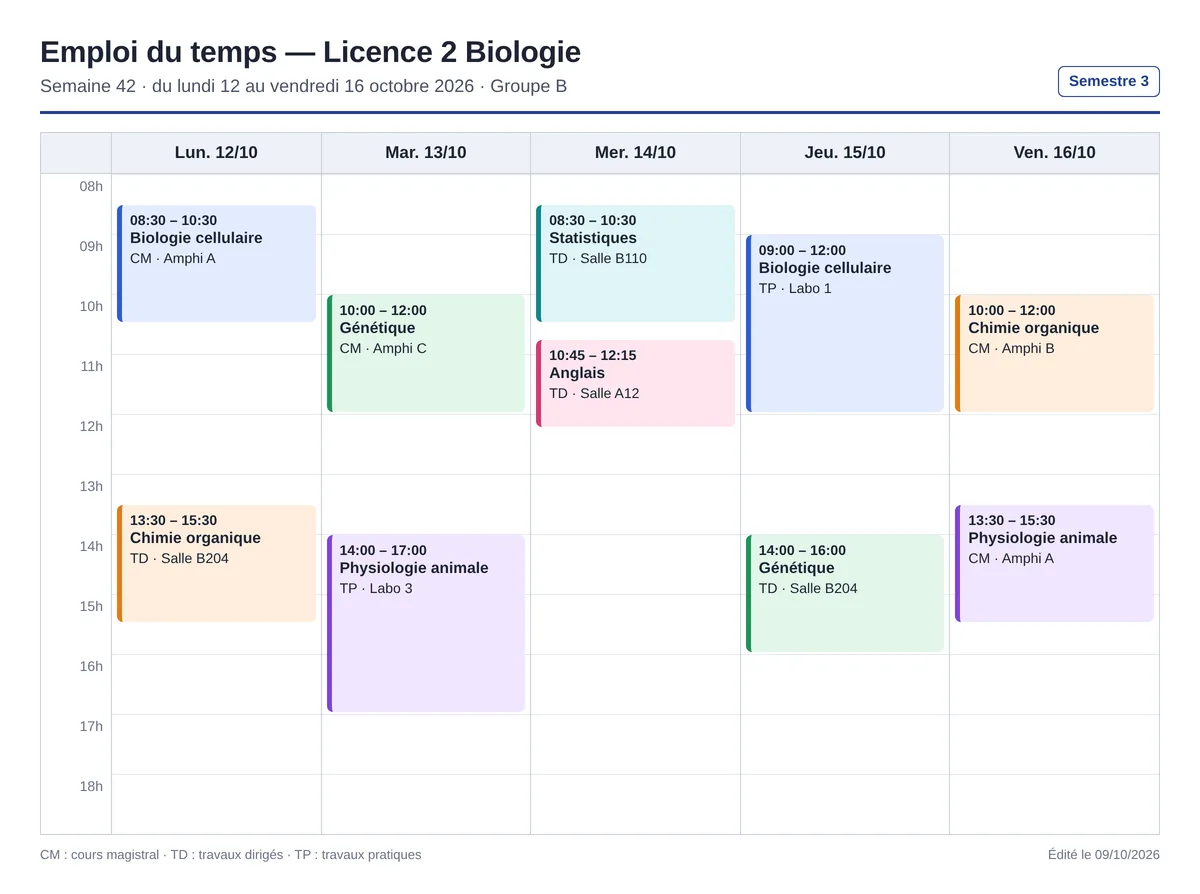
A photo, a screenshot or a PDF. Here, Léa's timetable, in her second year of biology.
The file that was sent Say what you want
“Make me a typical week with my study hours between my classes and after. I eat at 9pm, I go to bed at 11pm, football on Wednesday from 6pm to 8pm. No studying on Sunday.”
Get your typical week
Her study time between her classes and after, dinner at 9pm, football on Wednesday, nothing after 10:30pm, and Sunday free.
Change it in one sentence
“I also have basketball on Monday from 6pm to 7:30pm”: the assistant redoes her week.
Your typical week is a suggestion: nothing is added to your calendar.
What happens in the video
Send your schedule
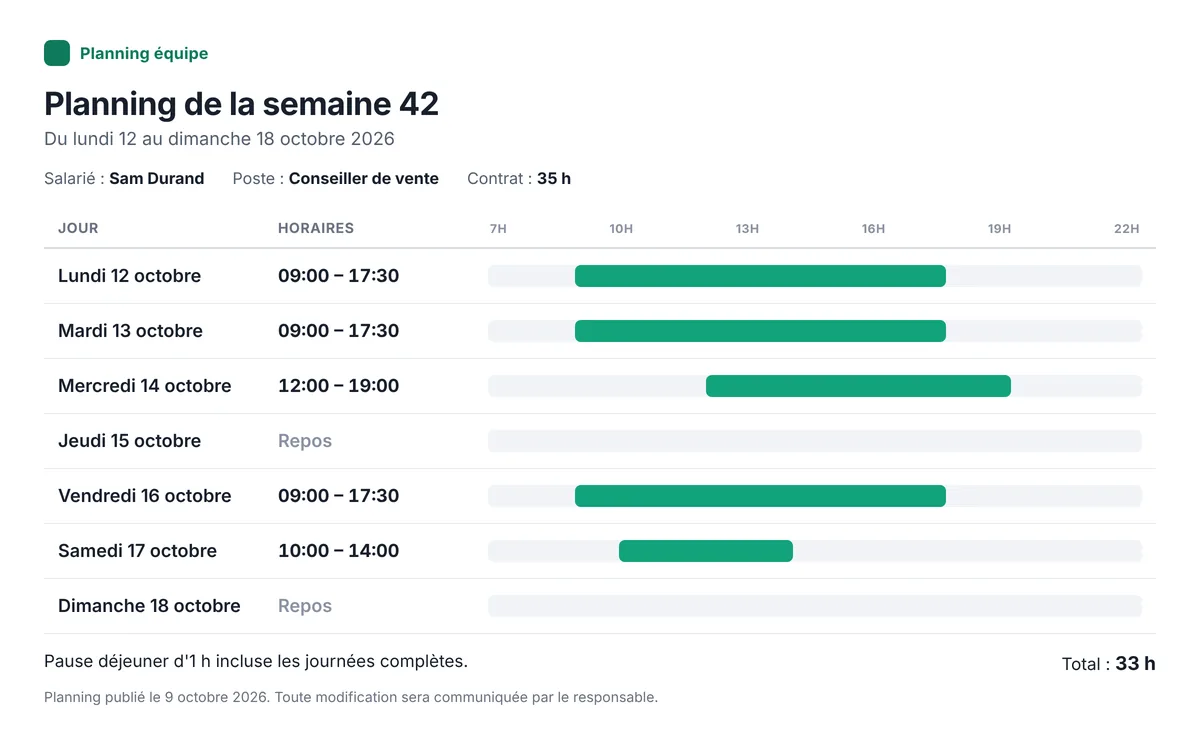
A photo, a screenshot or a PDF. Here, the schedule of Sam, a sales assistant.
The file that was sent Say what you want
“Find me 3 workouts a week in the morning and 1 hour a day for my project in the evening. I have dinner at 8pm, I go to bed at 11pm.”
Get your typical week
Workouts on the mornings he starts late or is off, his project every evening, dinner at 8pm, nothing after 10:30pm.
Change it in one sentence
“Add 30 minutes of reading every evening before bed”: reading goes just before bedtime.
Your typical week is a suggestion: nothing is added to your calendar.
What happens in the video
Create a group
In “Together”, give it a name. Here, Léa creates “Coloc” (her flatshare).
Send the link
Copy the invite link and send it to whoever you want: WhatsApp, Instagram, text…
They join
Sam opens the link on his phone, sees who's in the group and what is shared, then joins.
Your free times together
Everyone sees when you're all free in the next 7 days, from each person's schedule.
Study together
Léa taps a free time and suggests a law study session: Sam says he's in.
No one sees what's in your schedule: only the times when everyone is free.
What happens in the video
See when you're free
On Home: “free until 19:00”. Here, Inès has her Sunday afternoon ahead of her, before dinner at her parents'.
Ideas for that time
Depending on the time you have: study for an exam coming up, move a little, take a real break or go out.
Say what you feel like
Inès picks “an exhibition or a museum” and types “Lyon”.
Real ideas, with their link
Zelqo LIFE searches the web: exhibitions open that day in Lyon, each with a link to the site it was found on.
The ideas come from sites found on the web: check times and prices on the site before you go.
What happens in the video
Say when you train
Hugo, an economics and management student, sent his timetable and said: “I want to study 1 hour a day. Football Tuesday and Thursday from 6pm to 8pm, a match on Saturday from 3pm to 5pm.”
Turn on sport mode
In “My week”. It's already on if you pick “Fitness” when you sign up.
Meals around your trainings
On Tuesday: a snack at 5pm, football from 6pm to 8pm, a recovery dinner at 8:15pm. His study session moves to 9pm.
Guidelines, not a diet
When to eat and drink before, during and after: never amounts or calories.
These are general guidelines. For specific needs (competition, health, allergies), talk to a doctor or a dietitian.
What happens in the video
Your exam is in your timetable
Lucas, a law student, sent his timetable: his civil law exam is on Friday at 9am.
Your week gets ready
On the days before, his study time goes to this exam first, more and more until the day before. In red in his week.
Start a session
“Start” on a session: 25 minutes of focus, then a break. At the end, it's marked as done.
A reminder the evening before
With reminders on, his phone tells him the evening before each exam.
An exam that isn't in your timetable? Add it to your calendar with the type “Exam”.
Your turn: try it with your own schedule.
Try it free3 analyses and 10 assistant messages included. No credit card.